
Select an element
Choose Annotate design, then click rendered text or an image to attach your instruction to the intended part.
- Text and image targeting
- A comment beside the selected element
Point to the headline, choose the photo or draw around an area. Your comment travels with the part of the design it describes.
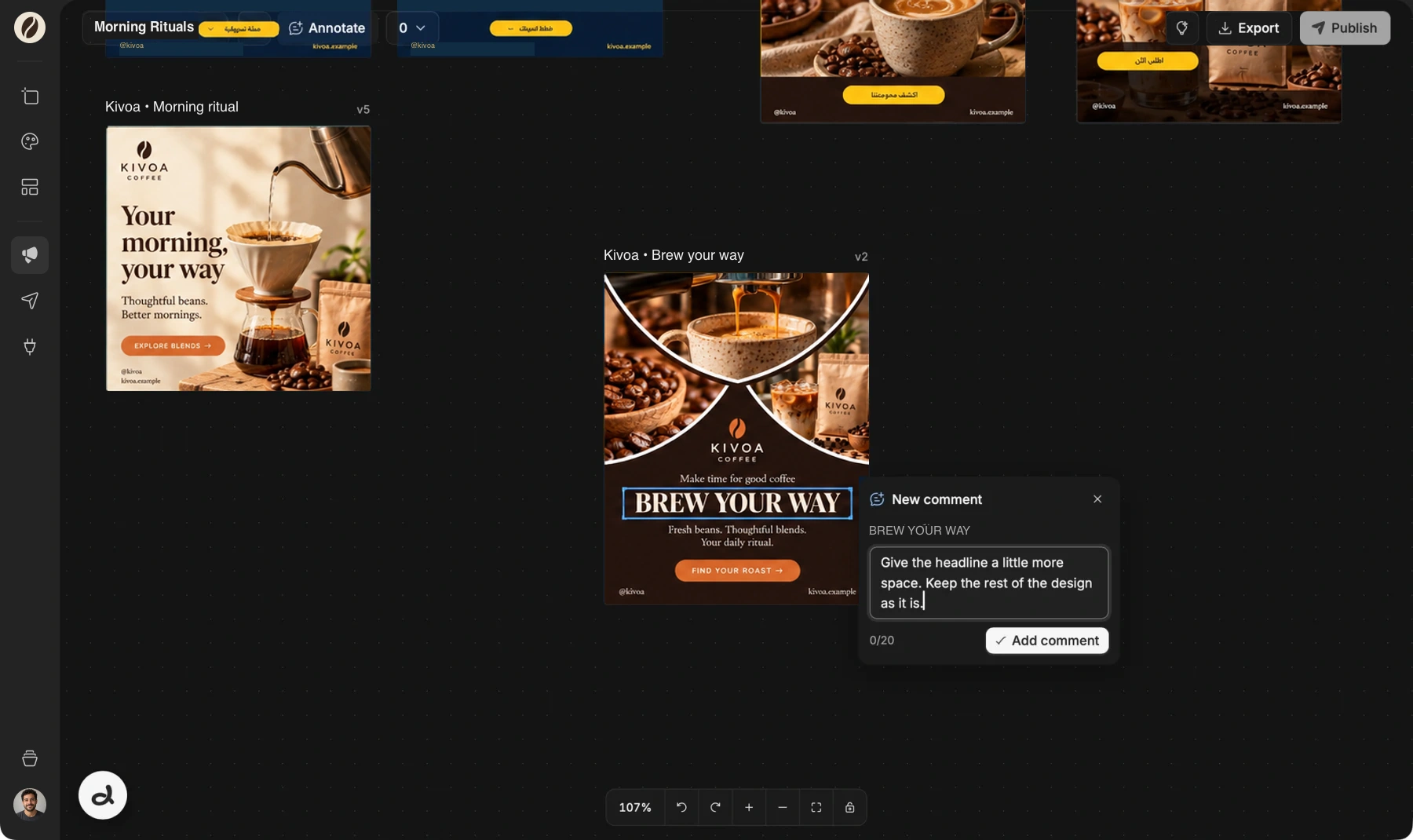
Doodi demonstration with fictional Kivoa Coffee content.
Choose Annotate design, then click rendered text or an image to attach your instruction to the intended part.
Drag a rectangle around a region when the change involves several elements or the space between them.
Keep adding and reviewing comments before sending. Saved annotation drafts remain available when you return.
Doodi receives the marked design and your instructions together. Image targets also offer replacement and regeneration actions.
The steps to try it in your own workspace.
Open the post’s context menu and enter annotation mode.
Click an element or drag an area, then write the change you want.
Check the queued comments in Doodi’s composer and send them together.
Answers about design annotations before you start.
No. Comments update the composer so you can review them before sending.
Yes. One message can include annotations for up to four posts.
Yes. Change image opens the project’s picker and applies your chosen replacement directly.
Doodi checks saved revisions and annotation targets. Comments that no longer match remain available for you to review instead of silently targeting another element.
Bring the brief, your brand and a good idea.
Make the next post in Doodi.